
Flint: Turning Skills into Personal Assets
Lately, every time OpenAI ships a new model, a familiar argument makes the rounds: skills are useless, and more and more users are abandoning them.
Is that true?
Yes and no. To be fair, the logic has merit. As models get stronger, plenty of skills really have been abandoned — mainly the so-called “general-purpose” ones like Superpower. Those skills existed to patch over gaps in model capability, and they did help back when no model was aggressively optimized for coding. As the models themselves improved, these things were gradually absorbed into the models, and naturally stopped mattering.
So are skills truly useless? Probably not. Below I’ll argue what skills are still good for as models get smarter, and then introduce the subject of this post: Flint. I’ll explain why I built it and what it does.
What Is a Skill
AI has been booming lately. The tech seems to iterate round after round, but in essence it’s just software engineering theory landing once again.
The skill layer aims at reusability, and corresponds to the various toolkits in software development.
The model, meanwhile, corresponds to the programming language layer.
How reusable something is determines whether a feature belongs in the language layer or in a toolkit.
An array or a map, for instance, should be built into the language rather than requiring a third-party package. Invoice-parsing logic, on the other hand, doesn’t belong in the language layer.
Mapping this onto where AI is today, a skill should occupy exactly this niche: something with some reusability, but not much — and something the AI doesn’t have enough corpus to learn on its own.
For example, how to use an in-house toolkit — especially an ancient, possibly obsolete tech stack that the model has no corpus for, whose knowledge lives only in developers’ heads. That’s a good candidate for a batch of skills frozen as team knowledge.
Or a workflow you’ve crystallized yourself — I manage tasks in Notion and generate weekly reports from it, so I can wrap that into a skill for the AI.
Another one: I wrapped a skill that drives my browser with real cookies, so I can use it on sites with aggressive anti-scraping. Wrapping this kind of skill is easy; downloading an equivalent from the internet is not. Some agents now wrap such capabilities themselves, but they never quite fit how you’d like.
So as models improve, skills won’t disappear — their useful range will just narrow to these middle-reusability tasks: too bothersome to not reuse, yet not universally reusable. Download someone else’s skill and you’ll find it doesn’t quite work.
This is exactly the motivation behind Flint: managing skills like personal assets.
What Flint Is
Flint is a local-first personal asset manager for AI skills (official site: flint.lichuanyang.top). In one sentence: it gathers the skills scattered across your various agents and projects into one place — unified tagging, search and filtering, deduplication by name — and then deploys them on demand into each agent’s and project’s own skills directory. It’s a local backend plus a web frontend, started by a single script; your skill repository is just an ordinary directory on disk, and each agent’s skills directory is distributed from that single source via symlink or copy. From then on there is only one master copy of each skill, sitting on your own turf, deployed wherever it’s needed.
The UI has six modules, each with one job:
- Library: browse, search, and filter all your skills, preview the raw
SKILL.md, edit tags, trace each skill’s origin; also where you register your own repositories and third-party read-only repositories, pull skills scattered across agents back into a repository, or bulk-import from any directory. - Agents: one card per actual skills directory. Here you mark an agent active, attach presets, toggle skills one by one, and even choose symlink or copy per individual skill.
- Presets: a bundle of skills — explicit members plus skills matched by associated tags. A preset has no on/off switch; as soon as its members or tags change, it is instantly distributed to the active agents attached to it.
- Projects: register project paths and tags, and matching skills automatically land in the project’s
.agents/skillsdirectory (which can be committed to git and is self-contained across machines); skills evolved inside a project can also be written back to the repository. - Diagnostics: a six-dimension health check — sync, duplicates, broken symlinks, configuration, repositories, projects. All problems are listed in one place and fixed with one click after confirmation.
- Settings: the default install method (symlink / copy), an incremental sync watcher for copy mode, custom agents, and log viewing.
The first four modules chain into the main path — “gather → organize → deploy” — while diagnostics and settings are the fallback: when something goes wrong, go to the diagnostics page to see where; the default deployment behavior is set in settings.
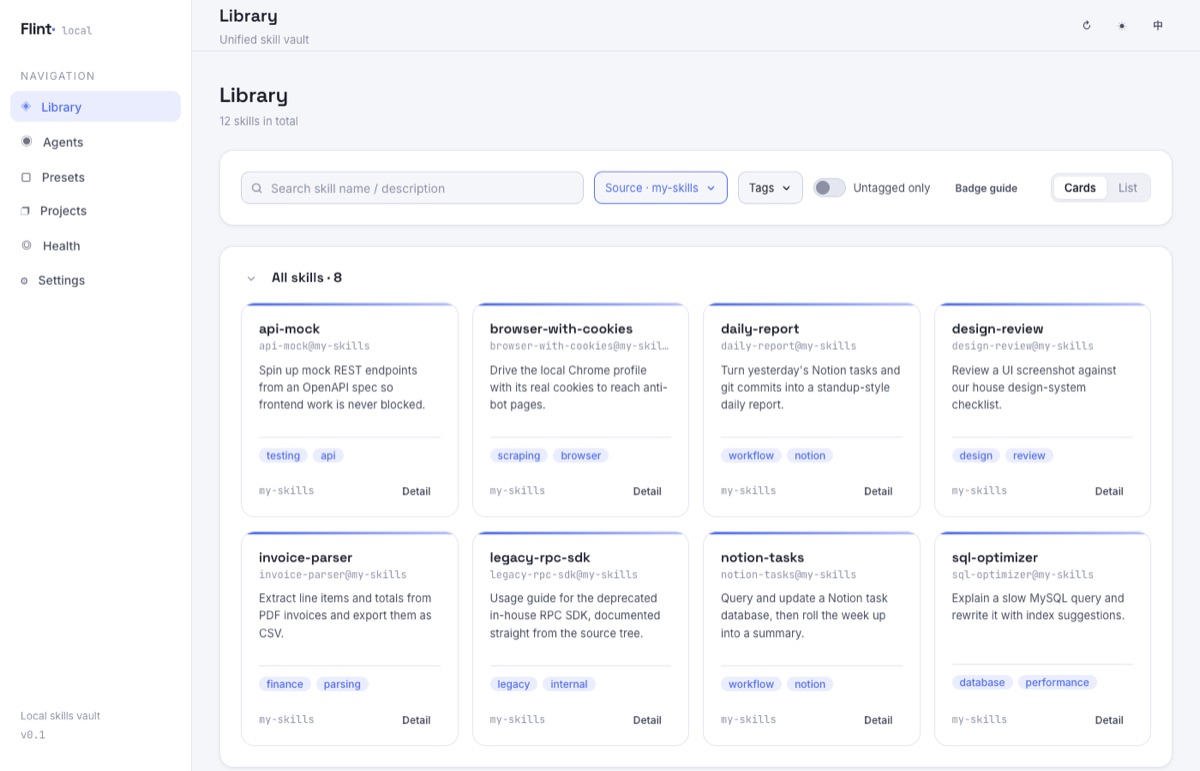
The two screenshots below give a sense of it (both demo data). The library page: all skills in one place, descriptions and tags right on the cards, with the top bar filtering by source and tags:
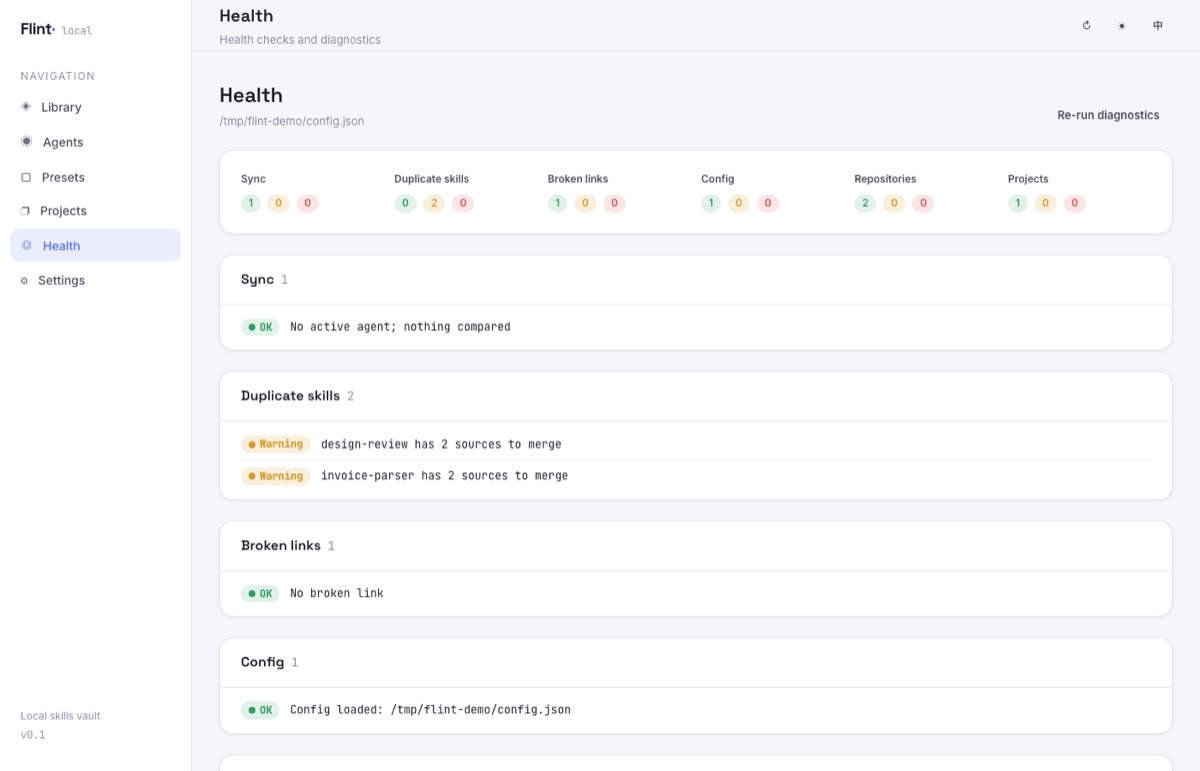
The diagnostics page: six dimensions of health-check results on one screen. The two “duplicate skill” warnings in the screenshot are the same skill stored once in an own repository and once from a third-party source, waiting to be consolidated into one:
Why I Need It
Beyond what I discussed above, there’s a practical factor that makes fine-grained skill management even more necessary.
I switch between agents constantly. There are a lot of “cyber bodhisattvas” these days — WorkBuddy hands out a free model today, TraeWork gives away a batch of free credits tomorrow, and Qwen, Xiaomi, and others don’t want to be left behind either. Free tokens are there to be used. But when you switch agents often, skill management becomes a problem.
Today I might build a daily-report skill in WorkBuddy; tomorrow I open TraeWork and find it unusable.
There are tools like npx for managing skills, but I tried them and none felt right. Most skill-management tools on the market are built around sharing and distribution: the goal is a big, comprehensive skill repository that then gets installed into each of the user’s agents.
That leads to a few very significant problems.
- The reusability problem I mentioned earlier. Someone else’s skill usually doesn’t run that well out of the box — I think most people have felt this to some degree. And conversely, to come back to the opening: if a skill really were highly reusable and worked out of the box, it would most likely be absorbed into the model itself, and there’d be no need for it to exist as a skill.
- The cost of switching agents. npx can install skills into all existing agents at once, but once you start using a new agent, the operation gets painful. Another big problem is that your own skills can’t be brought under tools like npx, which puts a huge burden on switching agents.
- The cost of using skills. Take an in-house skill set with maybe one or two hundred skills spanning frontend, backend, design, and ops. You might only use a small fraction of them, but without fine-grained management, you end up installing all of them. Almost every mainstream agent then injects the name and description of each installed skill into the system prompt so the model can decide whether to call it. At an estimated 50–100 tokens per description, 200 skills means a fixed overhead of 10,000–20,000 tokens per conversation — multiplied by the dozens of round trips in a single task, the bill adds up fast. Cost aside, the bigger headache is retrieval efficiency: the longer the candidate list and the more irrelevant entries, the more likely the model picks the wrong skill or simply misses the right one — like hunting for your own wrench in a toolbox stuffed with other people’s tools.
For these reasons I built Flint. The name comes from Obsidian.
Obsidian sums up its philosophy on its website in three lines: Sharpen your thinking, Your thoughts are yours (notes live privately on your device, unreadable by others, not even by the company), and Your knowledge should last (open file formats mean you’re never locked in and keep ownership of your data long term).
Flint follows the same “stone as tool” naming lineage: obsidian is naturally sharp volcanic glass that ancient humans knapped into blades; flint is the other “tool stone” standing alongside it, only with the object being sharpened changed from knowledge to skills. Flint’s two traits map neatly onto the project’s two actions — knapping: gathering scattered skills, deduplicating, tagging, and striking them into precise, handy tools; and spark: deploying and distributing skills into every agent and project directory so they actually catch fire and get to work.
Every skill you collect is a piece of flint waiting to be struck into a spark.
Core Idea: Manage Skills the Way Obsidian Manages Knowledge
Following that same lineage of thinking, Flint carries those three ideas over to skill management one by one:
| Obsidian’s idea | Flint’s counterpart |
|---|---|
| Local is private | Skills exist only as ordinary files on your local disk — no cloud, no account, no telemetry |
| Open formats, never locked in | A skill is just a SKILL.md directory on disk, ready to open, edit, diff, and commit with git; change tools or ecosystems and this asset comes with you and keeps working, with no lock-in to Flint |
| Sharpen your thinking | Gather, deduplicate, and tag, then deploy with one click to the agents and projects that need them, so your personal skill library gets handier the more it grows |
Two design choices are worth calling out. First, metadata stays as close as possible to open-source ecosystem consensus: tags are written preferentially into the top-level tags field of each SKILL.md frontmatter — a location that 40+ tools including Claude Code and agentskills.io read natively, and that gets versioned by git along with the skill directory, rather than being stashed in some private database. Second, minimize ecosystem fragmentation: skills with the same name from multiple sources are automatically deduplicated to a single copy, and duplicates, divergences, and broken references are all surfaced on the diagnostics page to be handled in place, so the same skill doesn’t keep multiplying into copies across your environment.
The Minimum Path: Four Steps to Get Running
Flint is a small tool that runs locally (Node.js ≥ 20). The official site flint.lichuanyang.top has an overview and screenshots, and the usage docs are fairly complete, so here I’ll just run through the four necessary steps for first use:
- Install: run
./start.shin the repository root. The script checks the Node version, dependencies, and port usage automatically, and runsnpm installon first launch; when it’s done, just open a browser (frontend atlocalhost:5173, backend API atlocalhost:8787). - Register a repository: a repository is a collection of skills and the source of truth, corresponding to a directory on disk. Your own repositories you maintain normally; third-party repositories are registered as read-only sources, and the skills inside can be “imported” into your own repository at any time.
- Create a preset: a preset is a bundle of skills — explicit members unioned with skills matched by associated tags.
- Apply the preset to an agent: on an agent’s detail page, first mark it “active”, then attach the preset you just created. From then on, whenever the preset’s members or associated tags change, the active agents attached to it immediately receive the bundle.
With that, the minimum path — “register a repository → configure a preset → deploy to agents” — is complete, and your skills can already work across agents. Everything beyond that — gathering, takeover, project-specific skills, and the six-dimension diagnostics — is icing on the cake.
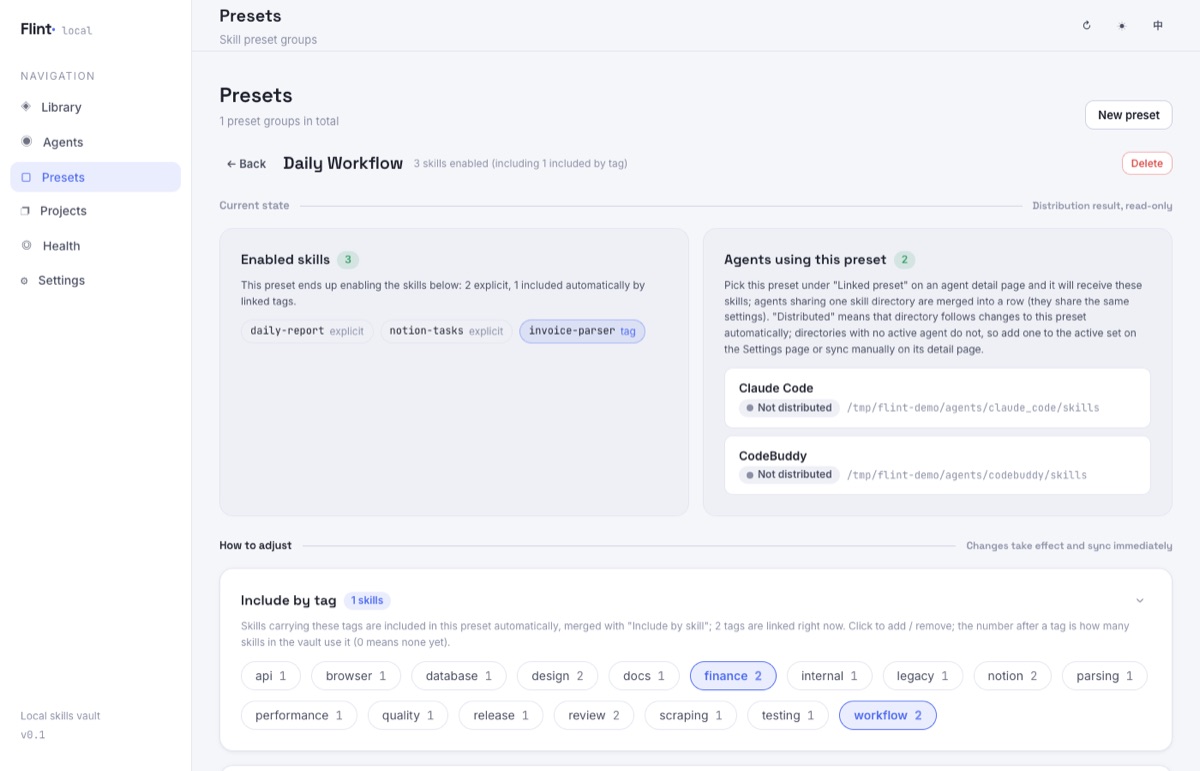
The preset detail page looks like this (demo data): the top half is the current state — which skills the preset ends up enabling and which agents it has been applied to; the bottom half holds two ways to adjust — “include by tag” and “include by skill” take the union, and changes take effect immediately:
Summary
That’s my take on where skills are heading and why I built Flint. If you find the approach sound, you’re welcome to try it and share feedback.
The project is open source, with the official site at flint.lichuanyang.top and the repository at GitHub: lcy362/flint. Clone it and run ./start.sh to try it out; README.md has the full guide. Issues and feedback are welcome. If it helps you, a star would be appreciated.
 微信
微信



Expanding choices through code
 Friend-link relay